

Introduction
After COVID-19, there was a necessary decrease in physical contact. Organizations of all sizes began believing in alternative ways to conduct their businesses. As a result, they allowed their information employees to start working remotely. To date, all modern organizations conduct most of their meetings remotely. Where necessary, technical experts on the software development side are also working remotely. While remote working offers convenience, it also presents unique cybersecurity challenges due to the excessive use of online technology platforms.
Remote work presents unique challenges for information security because remote work environments often lack the same safeguards as traditional office settings. In the office, employees operate behind multiple layers of security controls. While these measures aren’t foolproof, they make it more difficult to make security mistakes. However, when employees work remotely and use their computers outside the office perimeter, new risks emerge for the company, necessitating additional security policies.
Basic security measures for remote working
Keeping sensitive information safe is super important, especially when it comes to remote work. Allowing work from home to employees means they are accessing the organization’s digital assets from outside. You can’t allow them to straightaway access your network and systems, as that could be disastrous. you need to follow defined protocols as per your IT and security policy. For example, access control policies can help ensure that only the right people can view sensitive data, which reduces the chances of unauthorized access.
Zero Trust Model for secure remote working
As an organization, you are not supposed to trust users, devices, or systems by default. This is an effective approach to cybersecurity, which only allows verified users to access network resources. This way, you can significantly lower the risk of data breaches related to privilege escalation. Allowing access to remote workers with no security parameters may open doors for cyber risks and data being compromised for the organization’s digital assets, as well as reputational and financial loss for your company.
Identity and Access Management & Principles of Least Privilege
Identity and Access Management (IAM) systems are very helpful. It becomes more important if you are operating a financial institution or bank which have a significant digital presence. What IAM does is: it verifies the users’ identity and connects them with the permissions they need. This way IAM is enhancing your overall security. However, granting this access is conditional, which adds another layer of protection by ensuring that only compliant devices can access sensitive information. This way it keeps your data secure and guarantees that only authorized individuals can see it.
The Principle of Least Privilege is a key concept for assigning access to users, whether they are working remotely or on premises, in line with their job duties. By implementing this straightforward measure, you can dramatically minimize the risk of unintended access to sensitive information, safeguarding your privacy with ease and effectiveness.
With these basic principles for digital safety, you can easily provide a secure and trustworthy environment to all your staff and remote workers in particular.
Precautions for Digital Security while working remotely
Avoid public Wi-Fi
Public Wi-Fi is the key factor in digital information security breaches. Mostly, these networks are unsecured, and hackers can easily interpret your data communication through man-in-the-middle attacks. Some hackers are adept at stealing sensitive login and financial information. So, using public Wi-Fi without encryption can expose you and your company to severe cybersecurity threats.
Even when connecting your computer or laptop to public Wi-Fi networks, a masquerader can easily gain access to your system by impersonating a legitimate user and can leak or corrupt your data.
Personal Hotspot or Cellular services for remote working
One solution to this problem is to use a personal Hotspot. Owing to the availability of 4G and 5G cellular data networks, it is advisable to use them as a hotspot service. Although the data exchange between you and your destination computer or server, known as web traffic, is still unencrypted, it at least protects you from cyberattacks on the same public Wi-Fi network.
Virtual Private Network (VPN) – essential for remote working
A VPN is a technology that establishes a secure, encrypted connection between your device and the internet. It functions as a private tunnel for your data, shielding it from hackers, ISPs, and other unwelcome observers. Thus, it enhances online privacy and secure data transmission through encryption. This way, VPNs enable secure connections to company networks, ideal for remote workers handling sensitive data. In reality, a VPN makes your internet use more private, secure, and unrestricted.
Secure Remote Access Applications for working remotely
There is a list of applications that grant you safe access; however, it all depends on the information security of your organization. Before going into details of these applications, let’s have a look at the best cybersecurity practices and parameters to consider:
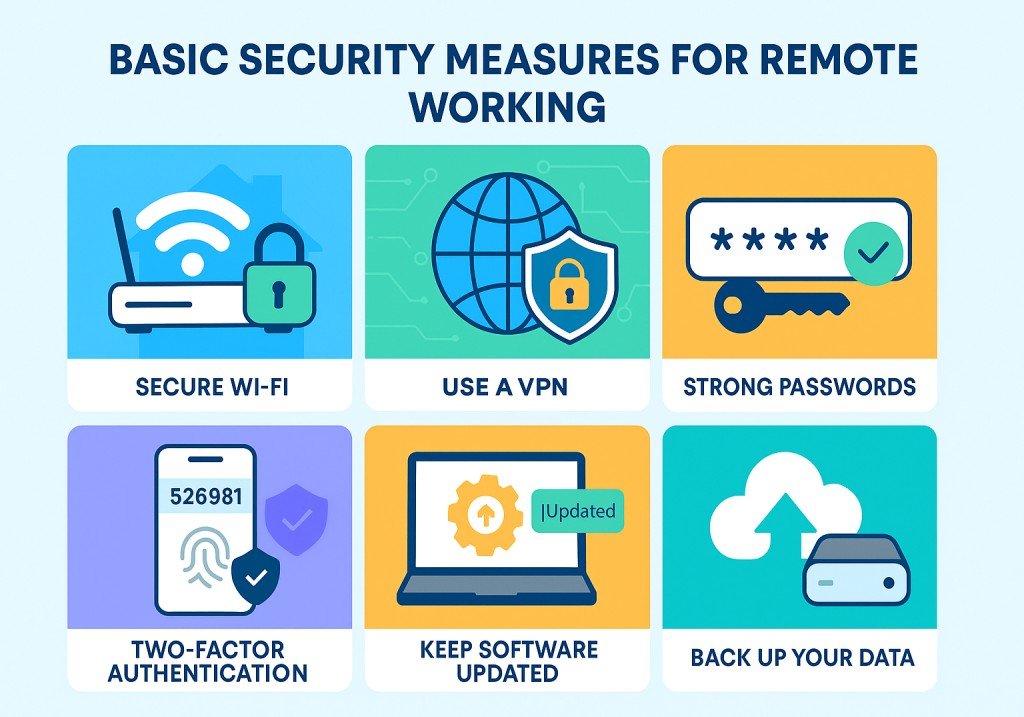
- Enable two-factor authentication (2FA)
- Use strong, unique passwords
- Keep software updated
- Controlled access by using role-based permissions.
- Keep track of and record access activities.
- Periodic backing up of critical data
Jump Server
A Jump Server, also referred to as a Jump Host, Bastion Host, or Jump Box, is a secure intermediary server. It serves as a gateway between the user and the target systems with an extra layer of security. As a user, you must first have the privilege to access Jump Server with access rights, and then you will be able to access the real server or resources from there. Some organizations use it to access and manage devices in different security zones, such as production servers located behind a firewall.
The Jump server provides a single point of entry to the organization’s network and systems. That’s why monitoring is easy from a security perspective, and attackers have little chance of penetrating actual systems or servers. In a tightly controlled access environment, organizations often configure to allow SSH only or RDP only, with strict IP restrictions and logging to a jump server.
Microsoft Remote Desktop (RDP)
What to do, in case you, as an organization, have to allow remote desktop to employees for remote work over the internet. Safety is the first thing that comes to mind. The remedy for allowing remote desktop connection to permit access to the office network over the internet is to ensure to have a valid VPN software is installed. This keeps the Remote Desktop traffic encrypted and prevents exposing your internal network directly to the internet. Examples include, but are not limited to, Windows Server VPN, Cisco AnyConnect, etc.
In a Windows environment, Microsoft allows remote desktop connection. The best aspect of it is that it utilizes Network Level Authentication (NLA) and offers encrypted communication. This is beneficial if an employee is working from a remote office and needs to access data on the same Wide Area Network (WAN) as the organization’s main office. RDP offers seamless integration with Windows, ensuring an effortless setup for internal networks. Its user-friendly design makes it an ideal choice for enhancing connectivity and collaboration.
TeamViewer
TeamViewer has gained immense popularity over the past couple of years. Many organizations have purchased the registered version of it and use it for meetings and as a remote access tool for employees. Its widespread use is dedicated to its end-to-end encryption and 2FA capabilities. TeamViewer is also a good tool for tech support staff to troubleshoot clients’ or internal employees’ PCs remotely. This tool is excellent for remote access and is compatible with various platforms. It keeps your organization safe from cyber threats while ensuring its cybersecurity.
AnyDesk
AnyDesk is a widely recognized remote desktop application. It facilitates safe users’ remote access over the internet. It gives you control over computers or devices from any location with internet connectivity. AnyDesk is extensively employed in professional settings for remote work. In information technology support setups, it is one of the best competitors to TeamViewer. support, and collaborative efforts. This application offers notable advantages, including high speed, robust security, and compatibility across various platforms.
From an information security perspective, it employs TLS 1.2 encryption for secure connections. TLS 1.2 (Transport Layer Security version 1.2) is a widely recognized cryptographic protocol. It ensures the security of communications over the internet. By encrypting data transmitted between a user’s device and a website or application, it effectively safeguards against unauthorized access and potential threats from hackers and eavesdroppers. It’s an aided security offering access control lists and whitelisting to manage who can connect over the network.
Prevention is the best remedy. As an organization, it is your responsibility to establish a robust IT security policy to prevent unauthorized individuals from accessing your network. Implementing proper IP whitelisting and role-based access control is essential to avoid security breaches, whether employees are working onsite or remotely.
You need to provide internet access to your employees governed by established security parameters. The appropriate VPN software and a company-registered antivirus package are essential on an employee’s PC or laptop when working remotely. It is essential to have clear protocols for employees to follow, such as prohibiting the use of USB devices or any external gadgets on official laptops or desktops. This helps prevent identity theft and network security breaches.
Practical Scenario
The organization I am working with has a robust security policy that ensures our network, data, and systems are safe. They ensure that users’ official desktops and laptops have Network Access Control (NAC) 802.1x configured and enabled on all devices, providing port-based authentication at the network switch level. All systems, especially those authorized for working remotely, have the latest Windows patches installed in addition to the allowed VPN client. Additionally, Kaspersky-level encryption is active on all such devices. Such tight cybersecurity practices help to avoid any threat attacks and safeguard against data compromise.
Conclusion
Working remotely offers significant benefits for organizations, employees, and the environment; however, ignoring security aspects can be detrimental. In this article, we have summarized basic security steps and ultimate threats for organizations and their remote workers. We have advised some key steps and secure applications for the security of your digital assets. Following these measures can help you out with a secure and trustworthy environment for your work-from-home employees and can save your organization from malicious actors.



Pingback: online-privacy-for-beginners-a-simple-guide-to-protecting-your-data
Pingback: cyber-attack-on-the-rise-how-to-stay-ahead-of-hackers
Pingback: Cybercrime Tactics Hackers Don’t Want You to Know -